Traduzione di immagini
L'unico strumento di traduzione delle immagini che legge, traduce e ricostruisce la pagina
Gli altri strumenti si fermano all'estrazione del testo. CAMB.AI rileva automaticamente ogni area di testo nelle tue immagini, fumetti, PDF e file PSD, la traduce in oltre 150 lingue e la reinserisce nell'artwork originale, mantenendo intatti tipografia e layout.
Cos'è la traduzione delle immagini
Un flusso di lavoro basato su progetti, non un filtro a un clic
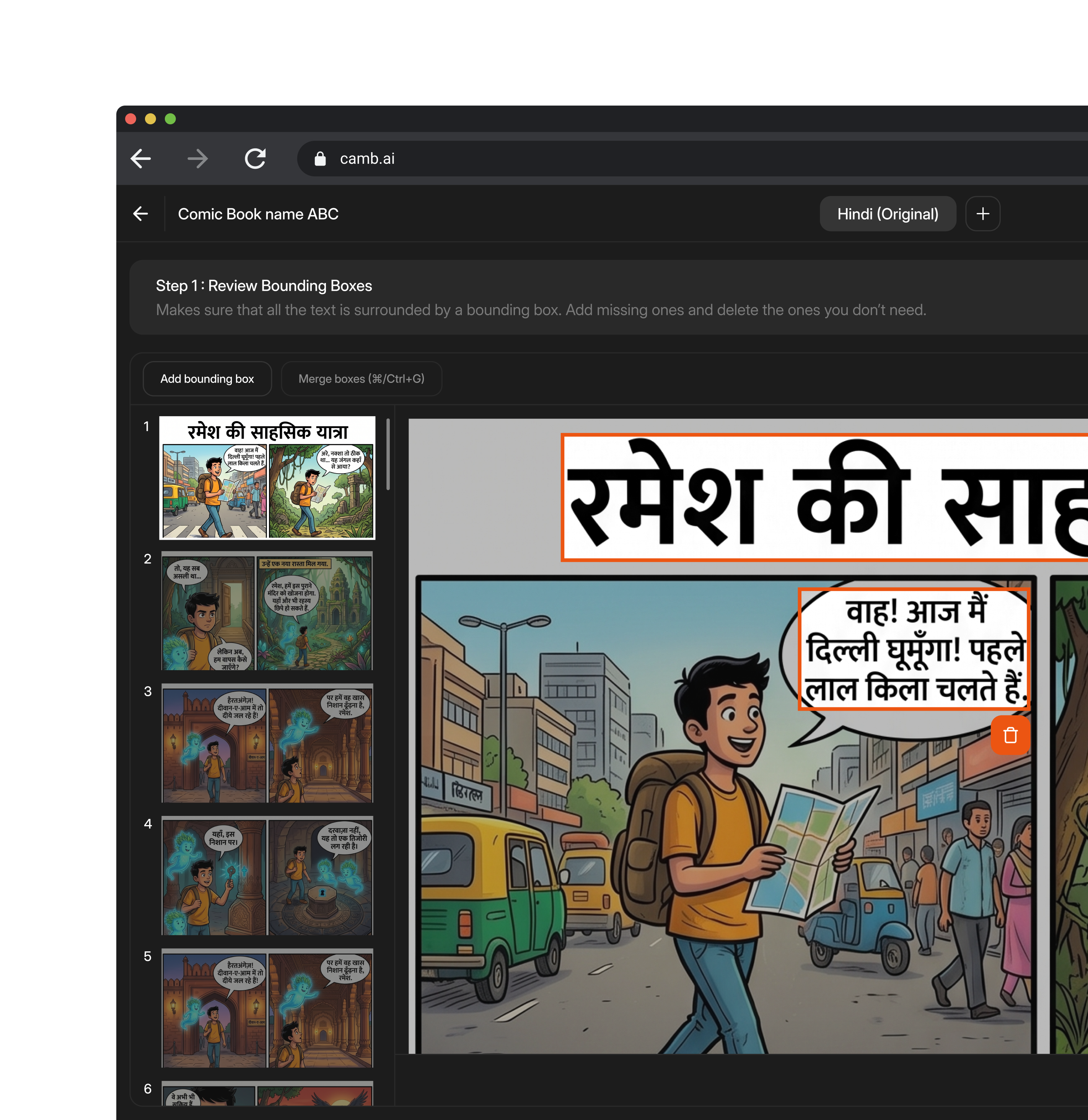
La traduzione delle immagini ricostruisce l'immagine tradotta invece di restituire semplicemente testo semplice. Carica un file per creare un progetto; CAMB.AI rileva automaticamente la lingua di origine e ogni area di testo, genera un'anteprima di ciascuna pagina e ti fornisce un riquadro di delimitazione attorno a ogni porzione di testo prima che venga tradotto qualsiasi elemento.
Rivedi quei riquadri, confermi che il layout sia corretto e poi traduci in una o più lingue contemporaneamente. Ogni risultato rimane modificabile in una tabella di traduzione, con rigenerazione assistita dall'AI per le singole aree e una cronologia completa delle versioni, così i team possono fidarsi del risultato, non solo del primo tentativo.
Pensato per i casi difficili
Traduci i formati che gli altri strumenti non riescono a gestire
Fumetti
Fumetti e graphic novel
Rileva i dialoghi tra vignette e nuvolette, traduce ciascuno di essi e lo re-inserisce sul posto, lasciando intatti il layout delle vignette e l'artwork.
Manga
Manga
Gestisce l'ordine di lettura verticale, da destra a sinistra, e le nuvolette dense, traducendo i dialoghi preservando il flusso originale della pagina.
File PSD
File PSD e file di design a livelli
Legge direttamente i livelli di testo esistenti invece di eseguire l'OCR, generando automaticamente i riquadri di delimitazione dalla struttura dei livelli, così gli editor possono lavorare con livelli familiari.
Slide
PDF e slide
Elabora ogni pagina o slide con lo stesso flusso di lavoro di rilevamento, revisione, traduzione e rendering, con una barra laterale di miniature per navigare tra file lunghi o multipagina.
Casi d'uso
Per chi è pensata la traduzione delle immagini?
Team di marketing e creativi
Localizza materiali creativi di campagna, annunci e grafiche social per nuovi mercati senza dover coinvolgere di nuovo un designer per ogni lingua.
Team e-commerce
Traduci immagini di prodotto, foto di packaging e grafiche delle inserzioni alla scala richiesta da un catalogo in crescita.
Team media e contenuti
Localizza miniature, infografiche e contenuti visivi per un pubblico internazionale senza ricostruire i file sorgente.
Come funziona
Dal caricamento alla traduzione renderizzata in sei fasi
FAQ